Jacquie Lawson Ecards
- 4.7
- Rating
- 500.00K
- Installs
- Free
- Price

 Analysis by App-foxy
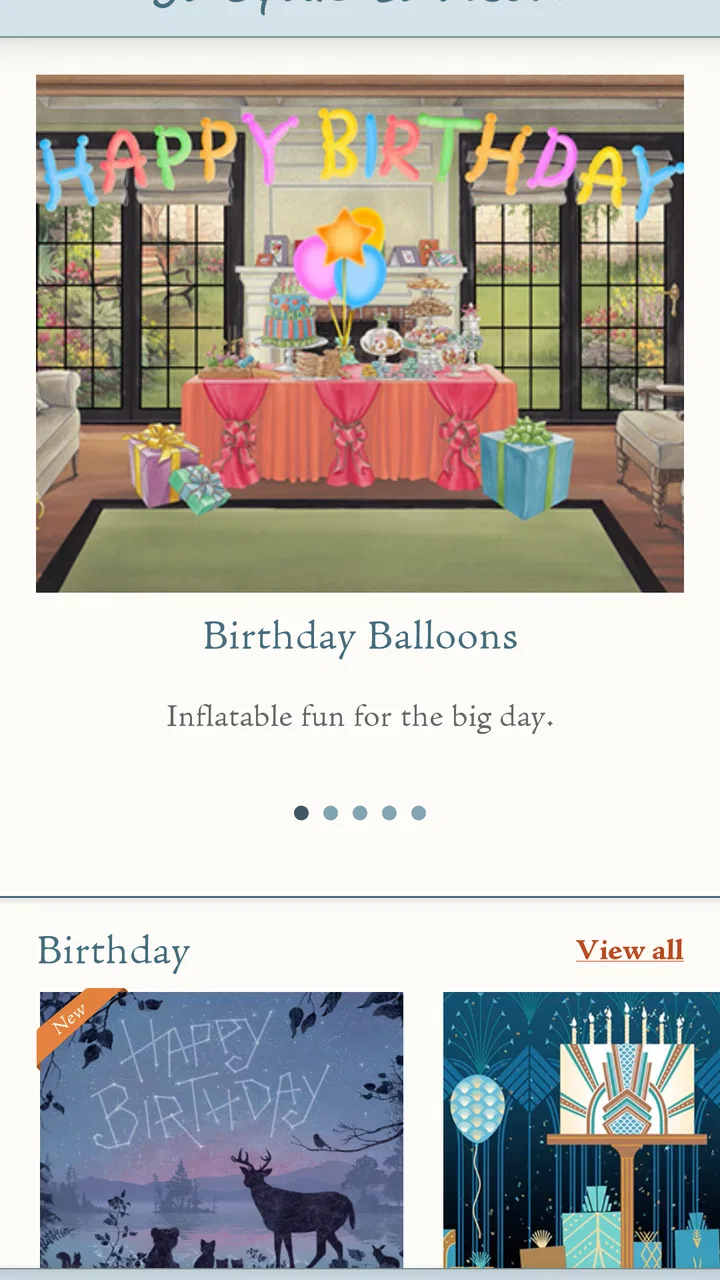
Sending a card from a phone is easy; sending one that feels chosen rather than copied is much harder. That is the problem Jacquie Lawson Ecards tries to solve. This free lifestyle app from Microcourt Limited focuses on browsing and sending animated electronic cards, with the Jacquie Lawson name placed at the center of the experience. After spending time with it, I found its strongest quality is not simply animation. It is the way movement, music, illustration, and a short personal message can make a digital greeting feel more deliberate than a quick text.
I would recommend it to someone who wants a polished greeting for a birthday, holiday, thank-you, or family message without designing anything from scratch. I would not recommend it as a replacement for a private chat app or a simple image-sharing tool. Its value appears when the card itself is part of the gesture. You are choosing a small presentation, not merely attaching a picture.
Why the animated-card approach matters
The app’s central capability is the ability to browse animated ecards and send them to another person. That sounds straightforward, but it changes the decision I make as a sender. In a normal messaging app, I usually begin with the recipient and then search for an image, sticker, or emoji. Here, I begin by exploring finished card designs and asking which one matches the occasion and the person.
You May Also Like

 Blood Strike: 2.5 Anniversary
Blood Strike’s Loadouts Turn Every Drop Into a Tactical Gamble
A close look at Blood Strike’s custom loadouts: how fast access to signature weapons reshapes its battle royale rhythm, rewards preparation, and narrows the gap between fights.

 Pandora - Music & Podcasts
Pandora’s Music Is Easy to Start, but Harder to Recover
Pandora’s strength is its low-effort path from a seed to a station. Its weak spot is how much confidence it asks you to place in connection, setup, and quiet recovery.

 8 Ball Pool
 Is Built on Rivalries, Rematches, and Routine
A close look at the rivalries, rematches, shared routines, and unanswered safety questions that turn a quick pool match into a persistent mobile community.

 Samsung Music
’s Quiet Strength Is Playing What You Already Own
Its reach comes less from spectacle than from dependable access to a personal library. That simplicity is both the app’s strongest retention engine and its ceiling.

 AccuWeather: Weather Radar
AccuWeather Review: A Quick, Clear Forecast for Everyday Decisions
For everyday plans, the best forecast is the one you can understand quickly. AccuWeather makes rain timing, radar, and local conditions easy to act on, with a few trade-offs.

 Hill Climb Racing
Why Hill Climb Racing Still Turns Crashes Into One More Run
A tiny car, a bumpy hill and one more upgrade: Hill Climb Racing keeps resurfacing because its simple chaos makes every near-miss feel personal.
More From Our News Desk
View All News


That distinction is important. A static greeting image can be attractive, but it often feels like something taken from a quick search. An animated card has a beginning, a visual reveal, and a little sense of occasion. Even when the written message is short, the presentation does more of the emotional work. I found this especially useful when I wanted to acknowledge someone but did not have the time or confidence to create a thoughtful design myself.
The app is categorized as Lifestyle, which fits better than treating it as a general communications tool. It is not built around conversation, contact management, or social feeds. Its purpose is a small ritual: select a greeting, personalize the sending moment, and let the recipient open something more considered than an ordinary line of text.
One practical benefit is that the animated format gives me a reason to slow down before sending. Browsing encourages comparison between moods rather than pushing me toward the first acceptable result. A cheerful design may suit a friend, while a calmer one may be better for a relative or a message of appreciation. That choice is the real strength of the app: it turns sending a greeting into a selection process instead of an afterthought.
The animation is most useful when it supports the feeling of the message, not when it is treated as decoration for its own sake. A lively card can make a celebration feel brighter, but a busy design may be unsuitable for a serious or understated note. I learned to judge the movement and tone together rather than selecting only the prettiest thumbnail.
Browsing with a purpose instead of scrolling endlessly
The best way to use the app is to decide what you want the recipient to feel before opening the card collection. If I am sending a birthday greeting, I look for warmth and energy. If I am saying thank you, I prefer something that leaves room for my own words to carry the message. This small habit prevents the browsing stage from becoming aimless.
It also helps to think about the recipient’s habits. Someone who enjoys illustrated details may appreciate a richer animated presentation. Someone who checks messages quickly may prefer a card whose idea is clear immediately. The app gives me more expressive material than a basic emoji, but that does not mean every card suits every person.
Another useful approach is to treat the design as the opening sentence of the greeting. The visual style establishes the mood, while the personal note explains why I am sending it. When those two parts agree, the result feels intentional. When they conflict, even a beautifully made card can seem impersonal.
What sending feels like in everyday use
In practice, I would use the app when I remember an occasion during a busy day and want something more meaningful than a rushed message. I can browse the available animated designs, choose one that fits, and then send it as a dedicated greeting. The process is more focused than assembling an image, caption, stickers, and emojis in a regular messenger.
A realistic example is a family birthday. I may be working, notice the date, and realize that a phone call is not possible at that moment. A short text would technically do the job, but it could also look like a last-minute obligation. An animated ecard gives me a middle option: it is quick enough for the situation, yet it still presents the birthday wish as an event. I can add a personal sentence that refers to the person rather than relying entirely on the design.
This is also where the app’s free entry point matters. It costs nothing to install, so I can explore the experience before deciding whether it fits my habits. At the same time, the presence of in-app purchases ranging from $7.99 to $35.99 per item means I would pay attention before confirming any purchase. The free label makes trying the app easy, but it should not be read as a promise that every available card or collection is included without charge.
For a first-time user, I would recommend browsing before an important date rather than waiting until the final minute. The emotional value comes from choosing well, and rushed browsing makes it easier to select a card that looks attractive but does not match the recipient. If the app is being used for several occasions, keeping a mental note of which visual styles worked for different people can make future choices faster without making them feel automatic.
Personalization is about the message you add
The card provides the presentation, but I still need to supply the part that proves I know the recipient. A generic sentence can make a polished animation feel like a mass greeting. I get better results by mentioning a shared memory, a specific quality, or a simple reason I thought of that person.
For example, instead of sending only a broad birthday wish, I might refer to the person’s plans for the weekend or thank them for helping me recently. The animation catches attention, while the sentence makes the card belong to that relationship. This is one of the most important trade-offs in the whole experience: the app reduces design effort, but it cannot replace personal thought.
I also avoid overloading the note. The animated card already has visual activity, so a short, sincere message usually works better than a long paragraph competing with it. This is a small but non-obvious advantage of the format. It encourages me to edit my words and make the greeting easier to receive.
Where it is stronger than ordinary alternatives
Compared with a standard messaging app, Jacquie Lawson Ecards offers a more finished presentation. Messenger apps are better for ongoing conversation, quick replies, photos, and practical coordination. They are also more convenient when I need confirmation that someone saw a message or when the greeting is only one part of a longer exchange. An ecard app is better when the greeting itself is the point.
Compared with sending a static image from a search engine, the animated approach feels more curated. I do not have to worry about finding an image that looks attractive but has the wrong tone or appears unrelated to the occasion. The limitation is that I have less creative control than I would in a design editor. If I want to choose my own colors, arrange photographs, or build a card around a personal image, a dedicated design app is likely the better choice.
Compared with a social network post, a direct ecard can feel more personal and less performative. I am addressing one person rather than publishing a greeting for an audience. On the other hand, social networks are more convenient for a broad announcement or a group celebration. This app makes sense when I want the recipient to feel individually remembered.
The trade-offs I noticed before recommending it
The first limitation is the boundary between browsing and creating. The app is appealing because it handles the visual work, but that also means I am selecting from an established style rather than expressing myself freely. People who enjoy making collages, editing photos, or controlling every design detail may find the experience restrictive.
The second is the purchase structure. The app is free, but optional items cost between $7.99 and $35.99 each. That range makes it important to understand what I am selecting before I commit. For occasional greetings, a purchase may feel worthwhile if the card has exactly the right tone. For frequent use, the cost can change the calculation, especially if I expect the app to replace every birthday and holiday card I send.
The third trade-off is emotional fit. Animation creates impact, but impact is not always appropriate. A visually elaborate greeting may feel excessive for a brief professional thank-you or a delicate message. In those situations, a plain text note or a restrained static card can communicate more naturally. I would not choose this app automatically just because an occasion appears on the calendar.
There is also a practical question about the recipient. The sender may enjoy selecting an animated ecard, but the greeting only succeeds if the other person is comfortable opening that kind of message. Someone who prefers simple texts may see the extra presentation as unnecessary. I would consider the recipient’s communication style before making the app part of an important gesture.
The current version is 1.2.0, and the app supports devices running operating system version 9 or later. That makes the minimum requirement relatively approachable for people using older compatible phones, although I would still check the device before recommending it to someone who rarely updates their handset. The app carries an Everyone content rating, which is appropriate for a general-purpose greeting tool and makes it suitable for family use.
Who gets the most from this app
The strongest audience is people who want their digital greetings to feel more memorable without learning a design program. It is particularly useful for relatives, friends, and occasional senders who value presentation but do not want to spend an evening creating a card. It can also help someone who struggles to find the right tone in a message: the visual design provides a starting point, while the personal note supplies the individual meaning.
I can also see value for people who maintain relationships across distance. When a face-to-face visit is not possible, a carefully selected animation adds a small sense of ceremony to an ordinary phone interaction. It does not replace a call or a visit, but it can make a brief check-in feel less disposable.
The app is less suitable for users who send many greetings every day and need a fast, uniform workflow. Browsing is part of the appeal, so high-volume senders may find it slower than using saved templates or a messaging shortcut. It is also not the right tool for someone who wants complete ownership of the artwork, a photo-based memory card, or a conversation that continues inside the same service.
Families should find the Everyone rating reassuring, but I would still use normal judgment about the message and occasion. The rating describes the app’s broad suitability; it does not decide whether a particular animated greeting is right for a particular child, relative, or formal situation.
My recommendation after using the full idea
Jacquie Lawson Ecards succeeds because it concentrates on one clear job and gives that job more feeling than a plain digital greeting usually has. The combination of illustrated animation and a personal message can make a quick act of communication feel planned. I especially like it for birthdays, seasonal greetings, thank-you notes, and moments when I want to acknowledge someone without composing a long letter.
Its weaknesses are equally clear. The design control is limited compared with a creative editor, the purchase range deserves attention, and animation is not automatically the right tone. I would also avoid using it as my only communication app because it is designed around sending a finished greeting rather than maintaining an ongoing exchange.
The app has reached over 500,000 installs and holds a 4.7 average from roughly 23,000 ratings, which suggests that its focused approach has found a substantial audience. Those figures do not change my main advice: try it when you want a greeting with a little ceremony, not when you simply need to send information.
Overall, I think it is worth installing if you regularly send cards but dislike generic images and do not want to design from a blank canvas. Start by browsing for tone, check whether the card fits the recipient, and then write a message that only you could have sent. Used that way, the app’s animation becomes more than a visual trick; it becomes the small extra effort that makes a digital greeting feel genuinely personal.
FAQs for Jacquie Lawson Ecards
01What is Jacquie Lawson Ecards, and how does it work?
Jacquie Lawson Ecards is an app for browsing and sending animated digital greeting cards created by the Jacquie Lawson design team. After opening the app, you can explore cards for birthdays, anniversaries, holidays, thank-you messages, and other occasions. You choose a design, personalize the message and recipient details, then send it digitally, making it a convenient alternative to buying and mailing a physical card.
02Does Jacquie Lawson Ecards require a subscription or payment?
The app may be free to download, but access to the complete card collection generally depends on the purchase option offered in your region. Some versions or promotions may provide limited content, while a subscription or membership can unlock a broader selection and additional features. Before downloading or subscribing, check the current pricing, renewal terms, and available plans in the Google Play Store or Apple App Store.
03Can I schedule an ecard to be delivered on a specific date?
Yes, scheduling is one of the most useful features for people who want to prepare greetings in advance. When the option is available for the selected card, you can choose a future delivery date instead of sending it immediately. This is particularly helpful for birthdays, anniversaries, and holidays. Always review the recipient’s email address and the scheduled date carefully before confirming.
04Can I personalize Jacquie Lawson Ecards before sending them?
Most cards allow meaningful personalization, although the available options can vary by design. You can typically add a written message, enter the recipient’s information, and include your own name or sign-off. Some interactive cards may also let recipients enjoy animations, music, or small activities. The app is designed to preserve the polished artwork while still making each greeting feel personal.
05What should I know about using the app on Android or iPhone?
Jacquie Lawson Ecards is intended for modern Android and iOS devices, but compatibility can depend on your operating-system version and the app release currently available in your country. An internet connection is normally needed to browse, purchase, and send cards. You should also allow enough storage for updates and verify notification or email permissions if you want reminders about scheduled deliveries or account activity.
Pros
- Beautifully animated cards with polished artwork and music.
- Large selection for birthdays
- holidays
- and special occasions.
- Personalized messages make cards feel more thoughtful.
- Cards can be scheduled for delivery in advance.
- Works well for sending greetings internationally.
Cons
- Many premium cards require a paid membership or purchase.
- Some animations may take time to load on slower connections.
- The app can feel less convenient for quick
- simple messages.
- Limited customization compared with designing a card from scratch.
- Recipients may need a compatible device to enjoy all features.

Jacquie Lawson Ecards
Gallery